• Skip to main content
  • Skip to primary sidebar
  • Archive
    • Camera Reviews
    • Lens Reviews
    • Accessory Reviews
    • In-Depth
    • Galleries
    • Guest Post
  • About Us
  • Our Websites
  • Contact Us
  • Privacy Policy
  • Youtube

MirrorLessons

Mirrorless camera reviews right at your virtual doorstep!

Heather

Astrophotography, Light Painting, & Long Exposures with the Sony A7s – An interview with Andrew Whyte

06/08/2015 By Heather

Welcome to our series of 100 interviews we will be holding with photographers who use mirrorless cameras for their work! “Switching to a smaller and lighter system” has become somewhat of a buzz phrase as of late, but many working photographers take this philosophy seriously. From medical reasons such as resolving back and shoulder pain to the simple realisation that bigger does not mean better, photographers are turning to mirrorless systems now more than ever before.

This week’s interview is with Andrew Whyte, a long exposure photographer who creates original images using cutting-edge equipment and innovative techniques. His weapon of choice is none other than the low-light demon, the Sony A7s.

[Read more…] about Astrophotography, Light Painting, & Long Exposures with the Sony A7s – An interview with Andrew Whyte

Filed Under: Interviews

Presenting The Everyday Messenger by Peak Design – An interview with co-designer Trey Ratcliff

05/08/2015 By Heather

Trey Ratcliff has never been one to shy from a challenge. He was one of the first photographers to embrace the HDR technique which, love it or hate it, has become an extremely popular way of post-processing images. He also runs the web’s most popular travel photography blog, Stuck in Customs, where he has been posting a new image daily since its launch in 2004.

[Read more…] about Presenting The Everyday Messenger by Peak Design – An interview with co-designer Trey Ratcliff

Filed Under: Mirrorless News

The Handy Everyday Messenger Bag – Think Tank Urban Approach 10 Review

03/08/2015 By Heather

When I first start using a new messenger bag, there are three questions I always ask myself: Is it the kind of bag I’d feel comfortable carrying around on a regular basis? Is it going to protect my gear? And is it going to last me a lifetime?

The Urban Approach 10, one of the latest messenger bags from Think Tank specifically designed for mirrorless cameras, is a good example of a bag that meets all of these requirements. We’ve been testing it since our trip to Canada in May, and have found ourselves turning to it time and time again for both our landscape and urban photography trips.

[Read more…] about The Handy Everyday Messenger Bag – Think Tank Urban Approach 10 Review

Filed Under: Accessory Reviews, Bag Reviews

The Best Mirrorless Camera Accessories: 15 professional photographers share their favourite tools

31/07/2015 By Heather

The world of digital photography is richer in camera accessories than it is in cameras themselves. For any given camera, there are at least a dozen accessories to match, many of which have been expressly designed for that specific model. Indeed, it is no surprise that some of our most popular articles here on MirrorLessons are accessory lists.

Although Mathieu and I have the chance to try a number of mirrorless camera accessories, it is highly unlikely that we’ll ever be able to try them all. Even if we could, we would inevitably wind up promoting the products that suit us the best.

The thing is, what works for us may not work for you. This is why, for this particular list, we decided to seek out the opinion of fifteen well-known professional photographers who use mirrorless cameras.

We focussed on four accessories that people are most likely to need – flashes, tripods, straps, bags and filters – and selected the photographers according to importance of these accessories to their work. For example, we sought out tripod recommendations from prolific landscape photographers, as they are more likely to use tripods out in the field than, say, a street or wedding photographer.

As always, if you have a mirrorless accessory recommendation, please do not hesitate to share in the comments section of this article. We’re always interested in learning about new products!

A big “thank you” to all the photographers who contributed to this article!

[Read more…] about The Best Mirrorless Camera Accessories: 15 professional photographers share their favourite tools

Filed Under: Best Of, Best Of - Accessories

How I Light Paint Epic Milky Way Photos with the A7r – Guest post by Gavin Hardcastle

28/07/2015 By Heather

If you’ve ever tried light painting in your astrophotography, you’ve probably discovered how ugly and unnatural artificial light can often look. One of the questions I get asked most often is how I manage to get such clean and atmospheric light painting in Milky Way images.

Aside from using an awesome camera (in my case the Sony A7R), there is a certain method that I use to capture every part of my composition in a way that gives me maximum image quality and lots of control over light.

One Exposure vs. Multiple Exposures

how to take milky way photos

If I want the absolute maximum image quality in my Milky Way light painting images, I’ll need to shoot multiple exposures each with different light painting techniques and then combine those in Photoshop. It’s possible to get a really beautiful Milky Way image in just one exposure but I’ll have to accept the noise and general lack of image quality.

I’ve found that a lot of astrophotography photo contests insist on having the shot made with just one exposure so it’s a good idea to aim for this as a standard.

I’ll always shoot one exposure to create what I call my ‘Base Layer’. This is the one shot that I’m going to light paint as if I only had once chance to get it right.

I’ll then shoot additional exposures that are purely for my light painted foreground and nothing else. I combine those in Photoshop to get the perfect balance.

Shoot Your ‘Base Layer’ With ‘Bounced Light’

sony a7r astrophotography

My ‘base layer’ will either be my finished shot if I plan on entering a strict photo contest or it’ll be my base layer onto which I can add additional light painted exposures to get maximum image quality.

When shooting I use my widest aperture (like f/2.8), focus on a star and take a 30″ exposure when it’s fully dark and the stars are really clear.

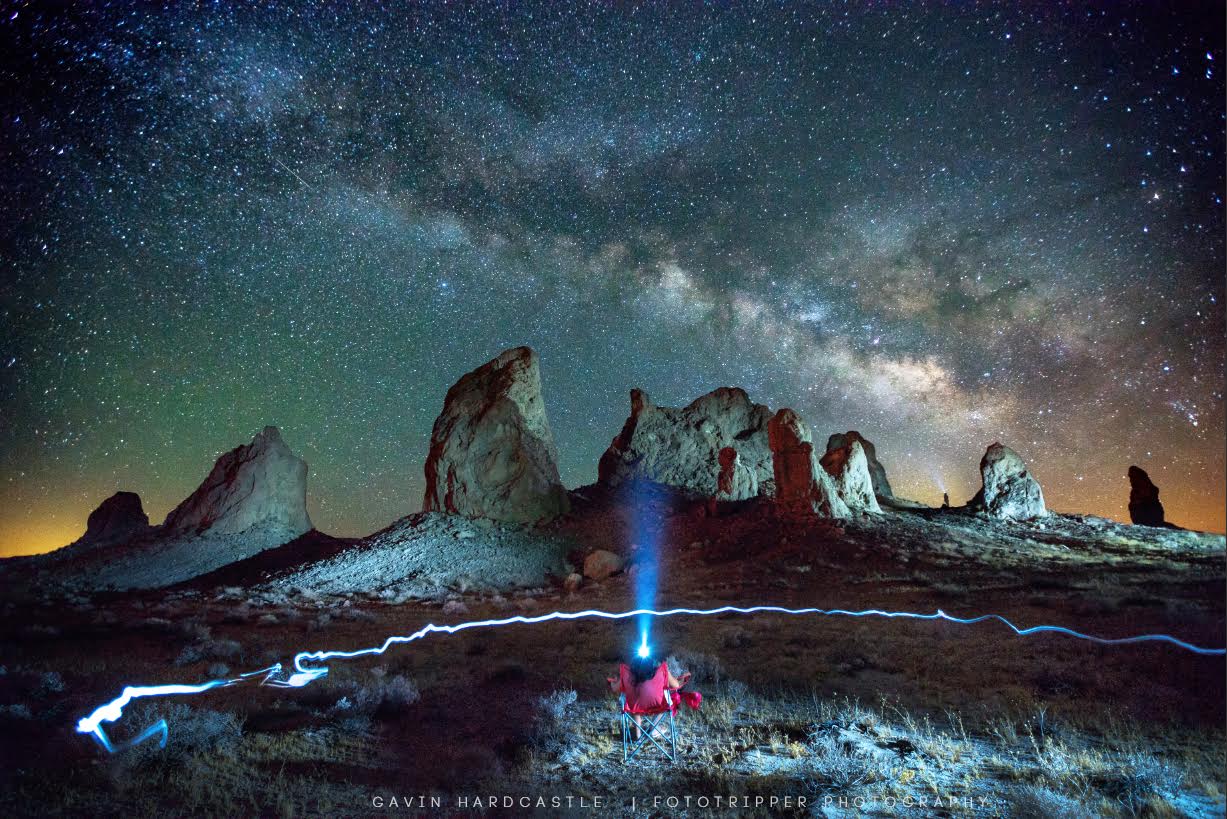
For the ‘base layer’ image I will rarely use direct light when light painting. Most often I’ll bounce my 300 lumen headlamp off another surface such as a wall, floor, tree, rock etc. The reason I bounce the light is because it becomes much softer and weaker and will balance better with the light I can see in the Milky Way. Bounced light that I can barely see with the naked eye will be extremely bright to the cameras sensor when set to ISO 3200.

I find that if I point my headlamp directly up into the air above my head and then angle it down ever so slightly, the scene before me will be gently illuminated by that soft light at a low angle.

I’ll also hold the headlamp behind my back and slowly pan it from side to side. If my foreground objects are fairly close and not too large (like a medium sized tree) this creates a lovely soft light from a very low angle.

During a 30″ exposure, that soft light can look very pleasing in the final image.

how to take milky way photos
This is an example of soft, bounced light for my ‘base layer’. I held the 300 lumen headlamp above my head pointing almost vertical. Processed with the ‘Lighthouse – Neutral’ preset from Gavin’s Milky Way Lightroom Presets.


Shoot Your Additional ‘Light Painted’ Exposures

If I’ve decided that I really can’t get the perfect shot with just one exposure I’ll have to shoot additional ‘light painted’ exposures. This is where the magic happens. I’ve shot my ‘base layer’ and it looks great but the foreground is really noisy and there’s only so much of that I can clean up with noise reduction. So here’s how I get around that.

Without moving the camera in any way, I change my ISO to 800 and my aperture to f/8. I don’t change any other setting.

how to photograph milky way

I now shoot another 30″ exposure while shining my light directly at one small part of my composition. I don’t try to light paint the whole scene, I just focus my beam on one area. This will result in an image that is mostly completely black but with a nicely illuminated area where I directed my beam.

I then repeat this process several times until I’ve lit all of the important surfaces in my composition and have an exposure for each.

Post Processing Milky Way Images

For the base layer, I’ll always use one of ‘Gavin’s Milky Way Lightroom Presets‘ to get the right colour hue, noise reduction, sharpening and basic enhancements that make that base layer pop.

To combine the additional exposures where I light painted each area of the composition, I’ll process those with the exact same Lightroom preset but this time I’ll remove the noise reduction. I then open all of my processed images in Photoshop and layer all of the ‘light painted shots on top of the ‘base layer’.

Once all of the images are placed on top of the ‘base layer’ I’ll then change the layer Blend Mode to ‘Lighten’ and BAM! I can now see all of my images combined.

sony a7r milky way

To get the perfect blend of ‘base layer’ and ‘light painted’ layers I’ll use Photoshops ‘Brightness / Contrast’ tool to darken the ‘light painted’ layers so that they blend more naturally with the base layer. I don’t change the opacity of the ‘light painted’ layers because that will just reveal the noisy dark areas of the ‘base layer’ underneath – and I hate noise.

With just a few quick tweaks the image is ready to be exported as a TIFF or JPEG and shared with the world.

Give it a Try

It takes a little bit of practice to get it right but once you’ve done it a couple of times you’ll get better very quickly.

Additional Shooting Tips

  • Use a Tripod
  • Shoot in Tungsten/Incandescent White Balance
  • Focus on a star using ‘Live View’
  • Use a blue light headlamp that has around 300 lumens or more
  • Turn off ‘Long Exposure Noise Reduction’
  • Don’t move your camera or tripod between shots

If I’ve missed anything please feel free to post your questions and I’ll be happy to answer.


Gavin Hardcastle is a fine art photographer, writer and instructor from BC, Canada. Become a better photographer today with his free photography guides and photography tutorials. You can learn from Gavin directly at his global photography workshops in some of the worlds most spectacular locations. Upgrade your post processing skills with his online video tutorials for Photoshop and Lightroom.

Filed Under: Guest Post

  • « Go to Previous Page
  • Page 1
  • Interim pages omitted …
  • Page 23
  • Page 24
  • Page 25
  • Page 26
  • Page 27
  • Interim pages omitted …
  • Page 87
  • Go to Next Page »

Primary Sidebar

Reminder

We have moved! Our latest reviews can be found on Mirrorless Comparison and YouTube.

DISCLAIMER & COPYRIGHT NOTICE

Heather Broster is participant in the Amazon Services LLC Associates Program, an affiliate advertising program designed to provide a means for us to earn fees by linking to Amazon.com and affiliated sites.

Heather Broster is a participant in the Amazon EU Associates Programme, an affiliate advertising programme designed to provide a means for sites to earn advertising fees by advertising and linking to Amazon.co.uk.

Heather Broster and Mathieu Gasquet are also participants in the following affiliate programs: B&H Photo Affiliate Program, Ebay Partner Network, Skylum (Impact Radius), Expert Shield, The Inspired Eye, and Mediterranean Photo Tours.

To read more information, visit our full Disclaimer page. Thank you!


© HEATHER BROSTER/MATHIEU GASQUET AND MIRRORLESSONS, 2013-2024

Unauthorized use and/or duplication of this material without express and written permission from this blog’s author and/or owner is strictly prohibited. Excerpts and links may be used, provided that full and clear credit is given to Heather Broster/Mathieu Gasquet and Mirrorless Comparison with appropriate and specific direction to the original content.